
How To Sync and Share Important Stuff Between Your Desktop, Your Notebook, Your iPad, Your iPhone and The Mysterious Cloud.
Like you, I’m In and Out, on the Go, and in a hurry. I need my important stuff handy wherever iGo and whenever I get there.
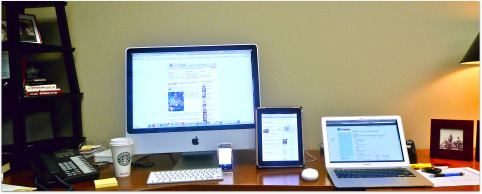
I searched around for something REALTOR® friendly. Something simple and affordable. Something that works smooth-like-real-butter, on my desktop, my notebook, my iPad and my iPhone.
I and settled on a beautifully simple application called Dropbox. The process is straight forward. If you’re looking for a simple synching solution, I think you’ll like this.
- Sign Up for your Drobox account. 2Gigs for free. 50GB for $9.99 per month. Or, 100GB for $19.99 per month. There are discounts if you pony-up a year in advance.
- Simply download the software to your computers/mobile devices and launch. Computer, iPad and iPhone applications are free.
- Drag previously saved files into your Dropbox folder (See below) and begin saving new important files to your Dropbox folder and you’re good to go.
Most of my important stuff, listing presentations, .PDFs, letters, contracts, photos, slide-decks, etc., I create on my desktop or notebook. For things I want to have handy anywhere (my desktop, my notebook, my iPad the cloud or my iPhone), I save it to the Dropbox Folder.
Here’s what you get on your computer when you install the Dropbox application. Notice the Dropbox folder on the left hand side (red arrow). To sync your files on all your geek stuff, either save new files to the Dropbox folder or drag previously created files from another folder to the Dropbox folder. The little green-for-go check-mark means the file has been successfully synced (the syncing magic happens quietly in the background).

After you save something, the Dropbox application automagically syncs your stuff to your high-security Dropbox cloud account. In the unlikely event that you need something important, and heaven forbid, you don’t have your computer/phone/iPad with you, just log on to your secure Drobpox account and get what you need. Here’s what my Dropbox cloud-account web site looks like:

After you save a file to one of your Dropbox enabled devices, or the cloud site, the next time any of your devices is connected to the internet, your files are synced. You can open any file, change it, save it, and it’ll be good to go on all you devices. Plus everything you need is everywhere you need it. Very simple, very affordable and very cool. The Dopbox app for mobil devices has some cool forwarding and sharing features too.
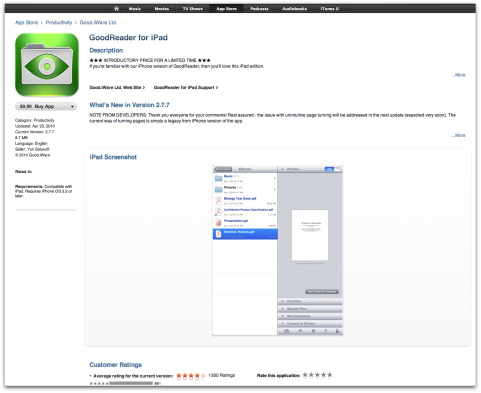
For the iPad, I recommend you buy (.99cents) the GoodReader.com application. This cool app, syncs with Dropbox and gives you magical viewing powers. You can open and read the most popular and common file types. Yes, Mac and PC.
OK. That’s it. I imagine there are other solutions, this one works great for me and I know it’ll work great for you too. If you get started, within a few minutes, all your important stuff will be everywhere you are, whenever you need it – Geek Sync completed.
Thanks for reading.
Cheers.


Roland Estada
Posted at 13:01h, 24 MayI use both of these and think they are great. I also use iAnnotate to take notes on showing. I print the listing to PDF then rearrange in the order of showing and import into iAnnotate which allows me to type notes on each listing page on my iPad.
Ken Brand
Posted at 19:52h, 24 MayNice Share Roland, I'm gonna check that out. Thanks.
Jeremy Hart
Posted at 22:32h, 25 MayThanks Ken – I LOVE Dropbox, and use it for two businesses. The ability to segment sharing is great, and I love that it saves a copy even if you're offline and then uploads it to Dropbox once you have an internet connection. I still think the iPhone version is a bit limited, but then it IS on a phone.
Ken Brand
Posted at 08:23h, 26 MayThanks Jeremy. You're right, there's so many magical things out there, our expectations are sky-high. Cheers.
JoeColleen
Posted at 10:22h, 26 MayExcellent resource. I have this portable hard drive I've been using, but it's not quite time effective. I'll give Drobox a try.
Karen Goodman
Posted at 12:02h, 31 MayI use a similar service, SugarSync. Two weeks ago, someone broke into my house and stole my tv, ipod and my computer. The tv and ipod can be replaced easily enough…it's just money. But the laptop had my whole life on it.
I am so thankful that I was able to log onto SugarSync from my mom's computer and my Droid, and grab any file that I needed. I still haven't gotten everything sorted out with the insurance, so it may be a week or two before I replace the Sony Viao. In the meantime, I went out and picked up a netbook (which I planned to buy for an upcoming trip anyway). I downloaded the SugarSync app to the new computer and it immediately started downloading all of my files. I didn't lose a thing other than some emails stored in folders on Outlook.
Another big bonus is that most of these services save the last few versions of each document. Sugarsync saves the last 5 versions. If you've ever hit 'save' instead of 'save as', you can imagine how this might come in handy.
Karen Goodman
Posted at 19:02h, 31 MayI use a similar service, SugarSync. Two weeks ago, someone broke into my house and stole my tv, ipod and my computer. The tv and ipod can be replaced easily enough…it's just money. But the laptop had my whole life on it.
I am so thankful that I was able to log onto SugarSync from my mom's computer and my Droid, and grab any file that I needed. I still haven't gotten everything sorted out with the insurance, so it may be a week or two before I replace the Sony Viao. In the meantime, I went out and picked up a netbook (which I planned to buy for an upcoming trip anyway). I downloaded the SugarSync app to the new computer and it immediately started downloading all of my files. I didn't lose a thing other than some emails stored in folders on Outlook.
Another big bonus is that most of these services save the last few versions of each document. Sugarsync saves the last 5 versions. If you've ever hit 'save' instead of 'save as', you can imagine how this might come in handy.
USB 3G
Posted at 20:45h, 05 JanuaryWell, good news for me,
thanks!