
How to: Testing a New Site Design Without Impacting Production
Let’s face it, there comes a time when we all want to give our site(s) a new look and feel, or a fresh paint job. Joshua wrote an excellent post about a month ago on 7 Lessons I Learned From My Real Estate Site Redesign.
To take his article a bit deeper on the testing side, I wanted to address a common question folks have when contemplating a new site design:
How can I test a new site without impacting my existing one (from both an end user and search engine perspective)?
Today, I’d like to introduce you to a little known (at least outside the developer community) process that resides on everyone’s computer that runs Microsoft Windows: the Windows Hosts File.
What exactly is a ‘hosts’ file you ask and how can it help me?
Great, glad you did. To use an analogy, the windows hosts file is essentially like a local train track switch that lives on your computer. Before you visit any site in your browser, Windows looks at the Hosts file first before going out to the outside world for DNS resolution (i.e turning a friendly domain name into an IP address to hit for the content).
By adding an entry(s) to your local hosts file, you can bypass global DNS resolution and tell your specific machine (and only your machine) which IP address to use (X) for the friendly domain name you’re trying to reach (Y).
Let’s take a quick peek at the file so we can understand how it works. Click Start, Run, then type in:
notepad c:WINDOWSsystem32driversetchosts

This will bring up the following file in Notepad:

Notice the last line in the file that reads: 74.125.67.100 www.se11411.com. I added this line into my Hosts file for our demo purposes and we’ll dissect below what that line means exactly. Most likely, your Hosts file’s last line will end with the 127.0.0.1 localhost.
The Hosts file basically has two parts you can edit to achieve the results we want. #1 is the IP Address and #2 is the friendly host name (i.e www.your-site.com your-site.com). The IP address is the first column and the second column is the friendly name of the site that we’ll be testing out.
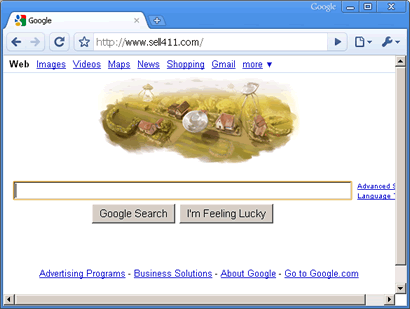
For our demo, I am going to use a test domain we own: Sell411.com – This will show you how to make the domain “www.sell411.com” domain actually point over to some Google IP addresses to load the Google Home Page in your browser.
After making the changes you see above, when you open a new browser and hit www.Sell411.com, you’ll be greeted with the Google Home page as seen below:
Now why would you want to do something like this?
Here’s why: Other than the obvious of using this new knowledge you have to play a trick on your friend, we can use it for some powerful purposes when it comes to site testing.
For example, let’s say you have an existing site you have hosted with Web Host A, we’ll call the site MattSellsHomes.com. We have a new site design that we want to test out without impacting our production site and users. So we go ahead and setup the site on another hosting account (Web Host B).
Once we set that up, we need to get the IP address from Web Host B and then we can edit our local Hosts file as shown above. Simply put the IP address supplied from Web Host B into the Hosts file on your local machine in addition to the MattSellsHomes.com and www.MattSellsHomes.com (these are on the same line and tab delimited in the Hosts file).
Once you do that, you can save the file and close out your browser. You’ll also need to FTP all your site files to Web Host B as well. Once you do that, open a new browser navigate to the MattSellsHomes.com domain. You’re now viewing the site on the Web Host B IP address that you’ll be able to fully test on as well as make changes to without anyone in your production environment seeing.
That’s it, with a little knowledge about the Windows Hosts file, you’ll soon be ready to start making changes to your sites from a testing perspective without impacting your current users or search engine rankings while you’re tweaking your new site design, etc. I’d love to hear how you use the Hosts file in your environments if you currently leverage this process from the Windows Operating System.
I Hope this article will prove useful for you in the future for testing new site designs or for just playing a little April fools joke on your co-workers.
Cheers, Matthew
Important Note: Make sure you remove the Hosts file entry after you’re done testing in case your email is located on the domain you’re testing. Thunderbird or Outlook will try and use the Hosts file as well 😉


How to: Testing a New Site Design Without Impacting Production … | RSS EYE
Posted at 20:22h, 21 September[…] original here: How to: Testing a New Site Design Without Impacting Production … How to: Testing a New Site Design Without Impacting Production … Posted in Computer, General, news, seo Tags: hosts « How to Play Video Game […]
Champ
Posted at 09:40h, 22 SeptemberThere is a really old program called Hosts Toggle that makes it really easy to turn on and off (and also edit) the hosts file with a single button click. You can find it here: http://www.accs-net.com/hosts/HostsToggle/
Website Design
Posted at 14:45h, 22 SeptemberInteresting, Matthew.
If you're using WordPress, I'm pretty sure there's a plugin which allows you to do something similar, except without all the technical hassle.
Good tip for non-WP sites though. Thanks.
appleton car accident lawyer
Posted at 09:03h, 23 SeptemberThanks for the help this is going to be a valuable resource in the future. Appreciate the post.
mustangtechnologies
Posted at 23:55h, 24 SeptemberThanks for sharing this great piece of information with all of us here. I especially liked “Now why would you want to do something like this?” Keep on sharing such stuff in future also.
Offshore Software Development
Posted at 05:55h, 29 SeptemberThanks for sharing this information here. I really liked “Now why would you want to do something like this?” Keep on sharing such stuff in future also.
Offshore Software Development
Posted at 12:55h, 29 SeptemberThanks for sharing this information here. I really liked “Now why would you want to do something like this?” Keep on sharing such stuff in future also.
dieta anului 2010
Posted at 10:33h, 03 JanuaryI was been looking the google for such information and i wanted to thank u for the post. BTW, just off topic, how can i find a copy of this theme? – 10x