
Online Meetings :: Really Feeling This…
You’re reading all over Inman and in other news, mobility of the real estate agent and the office. New apps that question, what is really the office? Do I have to meet clients at the office…or simply meet at a local coffee shop or cafe for face-to-face time.
Online meetings have extended that thinking. Given scattered email and phone traffic, along with various parties involved…all can be cumbersome depending on the objective. Sometimes you have to meet and hash things out.
Below is a mock screenshot of an agent conducting an online meeting…
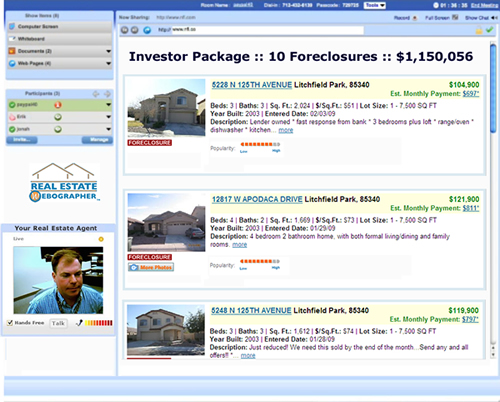
Specific Purpose Above:
- Agent is working with investors (wife & husband team) in Canada
- Investors looking to purchase many foreclosed homes in Arizona
- Email and phone traffic has been heavy, husband/wife investors not in-sync with each-other
- Agent holds online meeting to meet “face-to-face” with both (where they can at least see him).
- Meeting consists of showing listings, certain websites (synced so all are looking at the same web-page, at same time), etc.
There are many things to consider when acquiring an online meeting app…and protocols to best follow when conducting an actual meeting (I.e. don’t assume attendees will use meeting’s built-in VOIP feature [PC microphone/headset] during the meeting if you’re a regular Skype user…keep voice aspect over a typical phone).
Possibilities and usage are endless. Even in-house within the brokerage; associate brokers having meetings w/ agents (could be done online in some instances). List goes on…


Online Meetings :: Really Feeling This… | Search Engine Optimization Blog
Posted at 02:40h, 14 March[…] Original post: Online Meetings :: Really Feeling This… […]
Cedar Rapids Real Estate
Posted at 05:27h, 14 MarchMarc, I could also see it being used exclusively for showing relocation clients homes in the area that might interest them. In addition to the home show, you could switch over to the school districts website, the chamber of commerce website, etc… The possibilities are endless, but the bottom line is an end user experience second to none!
John Schroeder
Posted at 15:21h, 14 MarchIn the example above…what online meeting program was being used? Do you have any thoughts on good ones to check out?
Marc Grayson
Posted at 11:45h, 15 MarchJohn, the example above is using DimDim (http://www.DimDim.com). Great ease of use in sharing a webpage (synced so all see webpage, scrolling, mouseclicks) also powerpoints. Sharing of Desktop, in my opinion is “okay”. It is free to use.
I’ll be publishing a breakdown of all meeting software in next couple of weeks…likely here at GeekEstateBlog or Blog.Webographers.com. So many considerations when acquiring.
Portland Real Estate
Posted at 10:51h, 16 MarchOnline meetings, yet another way that we can save time and energy (and gas) using the internet.
Kevin Micalizzi, Dimdim Web Conferencing
Posted at 04:24h, 17 MarchMarc-
Great use of the technology. Have all your clients embraced the technology? Have they found Dimdim easy to use?
Thanks!
-k
Kevin Micalizzi, Community Manager
Dimdim Web Conferencing
e: [email protected]
twitter: @dimdim
facebook: dimdim.com/facebook
Dan Woolley
Posted at 06:30h, 17 MarchMarc – You might want to check out combining Dwellicious (http://dwellicious.com) with your DimDim/WebEx screen sharing. Clients can bookmark the listings they are interested in using one or more of the popular search portals, those will then be organized into one page. You can then use the sharing, discussion, and decision making tools on each bookmark to narrow down the clients favorites. Agents can easily provide value earlier in their clients internet search for homes with this kind of co-shopping experience.
Marc Grayson
Posted at 07:55h, 17 MarchDan, dwellicious would compliment perfectly. Pulling listings together from various websites under 1 URL…given meeting objective includes showing listings.
As it may, various sites show a single listing better than others…thus pulling under 1 umbrella falls under preparation.
Biggest thing with Online Meetings (especially using with clients or potential clients) is bring you A-game in preparation.
— Understanding the tool (so your not futzing during the meeting with “how do I do this…”
— Prepardness in what you want to show…any URLs handy, Powerpoints, etc.
— Whiteboard – many online meeting apps come w/ a whiteboard tool. I like using this to put an agenda out.
— Practice – many of times, you can practices with yourself (two browser windows…one as moderator…one as attendee)…or send a meeting invite to a peer just for good practice
Marc Grayson
Posted at 11:54h, 18 MarchKevin,
DimDim has served us well in teaching our REW candidates the value prop of an online meeting.
In addition, we have a meeting room powered by DimDim to allow candidates to engage the technology…adding as an app to our “sandbox of technologies” that candidates can play in during the certification experience as denoted here: http://www.webographers.com/agent/index.php#edu
Marc
Jared Yost
Posted at 21:57h, 21 MarchI would love to show anyone who is interested our take on this same topic. We have created a product called SiteSeer3D. One of its many uses is RemoteSiteSeeing, which allow the buyer to invite a remote buyer on a guided tour. The agent controls the view of the buyer as they navigate through a 3D landscape so the agent can point out all the feature of the property both inside and out. It works great for relocation, shoulder seasons and Virtual office. You can check it out at http://www.geodatatechnologies.com. If you want the full demo use the contact us page to send me an email.
Andrew @ Mikogo
Posted at 01:47h, 31 MarchHi Marc,
Have you used Mikogo before for online meetings? Mikogo is a free desktop sharing tool and can be used at no cost by both businesses and private users. Ideal for not only meetings and presentations, but remote support as well. Very secure and easy solution to collaborating over the Web.
Drop by our website http://www.mikogo.com to check it out. I’d be interested in hearing your thoughts on using Mikogo for online meetings in the real estate industry.
All the best,
Andrew Donnelly
The Mikogo Team
Joshanderson
Posted at 04:20h, 16 SeptemberOnline collaborating and teaching can work, If you have trust and the right tools.
I recently tried http://www.showdocument.com – good app for uploading documents and working on them in real-time.
Most file types are supported and it needs no installation. – josh
Free Games
Posted at 07:53h, 20 NovemberThanks for your Online meeting tips.. I personally think it's really helpful.
New sport
Posted at 06:56h, 28 JanuaryI comment of the great ADA sport will unite the world. Thanks to the Internet and mobile phones, there are no political, religious, bureaucratic or territorial borders
prada outlet
Posted at 03:00h, 31 MayWell , the view of the passage is totally correct ,your details is really reasonable and you guy give us valuable informative post, I totally agree the standpoint of upstairs. I often surfing on this forum when I m free and I find there are so much good information we can learn in this forum!
Anonymous
Posted at 12:22h, 24 AugustConsidering how the real estate market went down because of the financial crisis, more and more agents use video conferencing in order to get more clients.
homebuildingguru
Posted at 19:16h, 10 NovemberI use online meetings all the time. But in my mind agents should only use them when the client or prospect is long distance. Any local meeting should be face-to-face to build rapport and a stronger relationship.
bogac
Posted at 15:54h, 01 JanuaryHello man do you have new links ? I enjoy article evolve for my friend … ..
avize
Posted at 00:46h, 02 JanuaryHello man do you have new links ? I enjoy article evolve for my friend … ..
cell phone lookup
Posted at 13:27h, 02 JanuaryHello man do you have new links ? I enjoy article evolve for my friend … ..
prefabrik
Posted at 23:52h, 02 JanuaryNice post. Really good site…
internet marketing specialist
Posted at 11:03h, 03 JanuaryIn many ways ther
promotional water bottles
Posted at 21:23h, 03 JanuaryThere are a lot off other blogs that are not as interesting as this one.
cura slabire
Posted at 01:01h, 04 JanuaryI have beeing scouring the WWW for such info and i wanted to thank you for the post. Also, just off topic, how can i find a version of this theme? – Thanks
Alex79015
Posted at 07:12h, 27 JanuaryReal estate agents can have a look at GoMeetNow http://www.gomeetnow.com. This is a web conferencing service which agents can use to show their customers listings, property information and other presentation.